8 strategies for developing resilient workflows

The term “workflow” can be overused in enterprise jargon, and many organizations don’t fully grasp the importance of solidifying and maintaining workflows. It’s easy to underestimate their role in sustaining operations and driving efficiency.
Effective workflows aren’t just task sequences. Set up properly, they comprise the groundwork for consistent, adaptable and seamless IT operations. Resilient workflows minimize downtime, reduce the risk of task or process failure and help your organization quickly respond to unexpected challenges or opportunities. They support uninterrupted IT service management and boost productivity in areas of business that can otherwise be overrun with time-consuming, repetitive tasks.
Workflow health and Gartner SOAP Use Cases
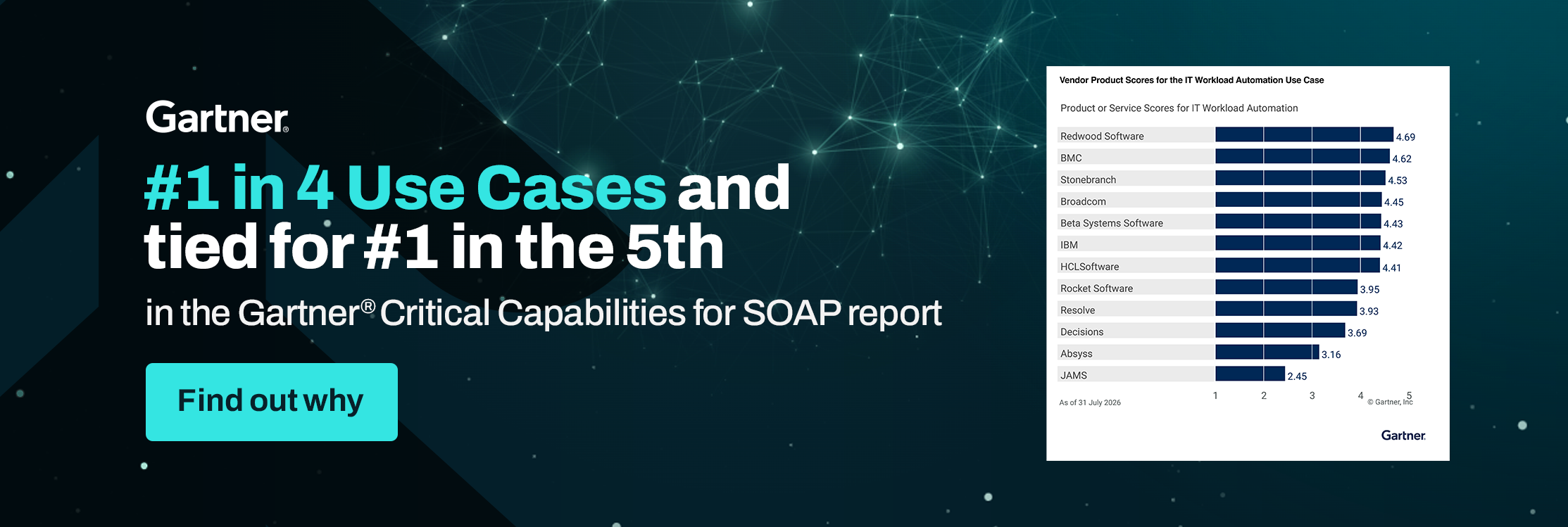
Accessible and dynamic workflows are so important in the world of modernization that Gartner® names IT Workflow Orchestration one of five Critical Capabilities Use Cases for Service Orchestration and Automation Platforms (SOAPs).
As businesses across industries prioritize process automation, ensuring that workflows are well-designed and capable of quick recovery becomes even more crucial than it has been thus far. SOAPs address this need by providing a unified platform for orchestrating complex workflows across varied apps and environments.
Incorporating workflow health into your automation initiatives gives your business processes a better chance of standing up under the pressure of scaling or integrating new technologies, fostering continuous improvement.
Use the following strategies to build workflows that work in all conditions.
1. Take advantage of low-code, drag-and-drop design.
Low-code/no-code interfaces streamline the automation design environment to help you build, edit and deploy workflows faster than with traditional development methods. With user-friendly, drag-and-drop tools, non-specialized IT professionals or business users can make adjustments to workflows as needed, which reduces reliance on your specialized IT team members.
The resilience factor: It’s possible to recover more quickly from failures or process changes since editing is easy. Low-code gives you the flexibility to react promptly to both demands and unforeseen issues.
2. Use event-based scheduling.
Many workflows operate on time-based scheduling. While effective in some cases, this method assumes that actions will occur at the same intervals without variation, which isn’t always realistic in complex operations. Event-based scheduling means your workflows are triggered by specific events rather than time-based assumptions.
The resilience factor: Your processes align with real-time operational conditions, and your workflows respond accordingly.
3. Set up intelligent exception handling.
Exception handling is vital for addressing errors or unexpected circumstances. Basic exception handling often focuses on technical errors, but truly resilient workflows can anticipate and address more intricate, process-level exceptions. A workflow automation solution that’s deeply integrated with your ERP can make this a possibility.
The resilience factor: You get automatic issue detection and resolution without human intervention, going beyond surface-level errors. The capability to maintain continuity and adapt to emerging problems is priceless.
4. Communicate using top-of-the-line encryption.
Communication within workflows often involves data transfers, which can expose your processes to security risks. Effective encryption is critical to maintaining data integrity and protecting your business from external threats. Utilizing top-tier encryption methods, such as TLS 1.3 and SSL, ensures your workflows stay secure, even when you’re sending communications across potentially vulnerable networks.
The resilience factor: It’s easier to shield your workflows from breaches or attacks and reduce the downtime caused by security incidents.
5. Integrate data transfer.
Data in motion adds unpredictability to your processes. When they’re not managed effectively, data transfers can cause delays, bottlenecks or even failed workflows. A managed file transfer (MFT) solution integrated with your workload automation (WLA) platform gives you control and visibility over your data movement.
The resilience factor: Workflows are stabilized — they’re more predictable and trackable. Therefore, you won’t create bottlenecks due to delayed or missed file transfers.
6. Centralize your automation controls.
Managing workflows across multiple platforms can lead to confusion and an increased risk of errors. Streamlining gives you oversight and makes it easier to detect and resolve issues across disparate systems.
The resilience factor: There are fewer points of failure with deliberately coordinated automations. Centralized controls create transparency across your workflows.
7. Choose truly extensible workload automation.
As your organization evolves, you introduce new tools and technologies. Workflows that rely on rigid, non-extensible automation solutions will struggle to keep up with demands and lead to disruptions or outdated processes. Instead, a WLA solution with built-in connectors and APIs will enable you to connect all your key systems and tools without compromising security or efficiency.
The resilience factor: When your workflows stay relevant, your organization stays agile.
8. Utilize the full functionality of your WLA solution.
Your WLA platform could offer advanced features that go unused in daily business operations. Educate your team on how to put protections in place to keep your end-to-end processes running smoothly.
For example, in RunMyJobs by Redwood, we advise:
- Setting system-wide and partition-wide defaults for chain and process definition and job retention at the highest level.
- Configuring automated alerts for housekeeping processes.
- Keeping one month of events, operator messages and audit data.
The resilience factor: You can continually monitor and optimize workflows, and checks and balances will prevent small issues from becoming major failures.
Choose winning SOAP solutions for workflow management
Redwood Software ranked first in four out of five Use Cases, including IT Workflow Orchestration, and tied for first in one Use Case in the 2026 Gartner® Critical Capabilities for SOAPs report. Get your copy now to learn how workflow automation software with SOAP capabilities can support your workflow resilience.
These graphics were published by Gartner, Inc. as part of a larger research document and should be evaluated in the context of the entire document. The Gartner document is available upon request from https://dev.marketing.redwood.com/resource/gartner-critical-capabilities-soaps/.
About The Author

Max Schultz
Max Schultz is an enterprise software executive, advisor and investor with experience across DevOps, AdTech and Infrastructure companies ranging from startups to the F500. His executive tenures have helped create $2+ billion of enterprise value via strategic exits and private equity recapitalizations. His M&A experience has led to the celebrated retirement of three distinct company founders who have trusted their life’s work to carry forward under his leadership, and world-class value creation for investors. Startups under his advisory have secured $50M+ in venture funding.
As Group General Manager at Redwood, Max leads both the Managed File Transfer (MFT) and Business Solutions (BS) business units – which house the JSCAPE, Cerberus, Finance Automation and Report2Web product lines. He is also responsible for Redwood’s strategic M&A initiatives, where he led the acquisition of Cerberus in 2023.
Prior to joining Redwood, Max held various senior leadership roles in sales, global customer success, and regional management at Test IO, a private equity-backed leader in software quality assurance. After helping lead Test IO’s sale to NYSE: EPAM in 2019 from the General Manager post, he was appointed CEO in 2022.
He holds a B.A. in Economics from the University of Southern California.